One of the Atty Labs paid strategies · A TradingView® indicator that shows its work

When the crowd stampedes,
you're already out in front.

Atty Stampede Algo measures how hard volume is pushing price — and which way. When pressure breaks the adaptive band and the trend gates agree, it prints the signal, draws your stop, and marks your target. On your chart. Automatically.

No repainting after bar close Auto stop & target levels Phone alerts via TradingView Works on a free TradingView plan
▶ Bar-replay demo · TSLA 15-minute · real signal, real frames

Recorded with TradingView's bar-replay tool — every frame is the indicator's actual output, bar by bar. Watch the dashboard flip from SCANNING to LONG, then ride to the target.

What You're Looking At

Everything on one chart. Nothing hidden.

No black-box arrows. Every piece of the read is drawn where you can question it.
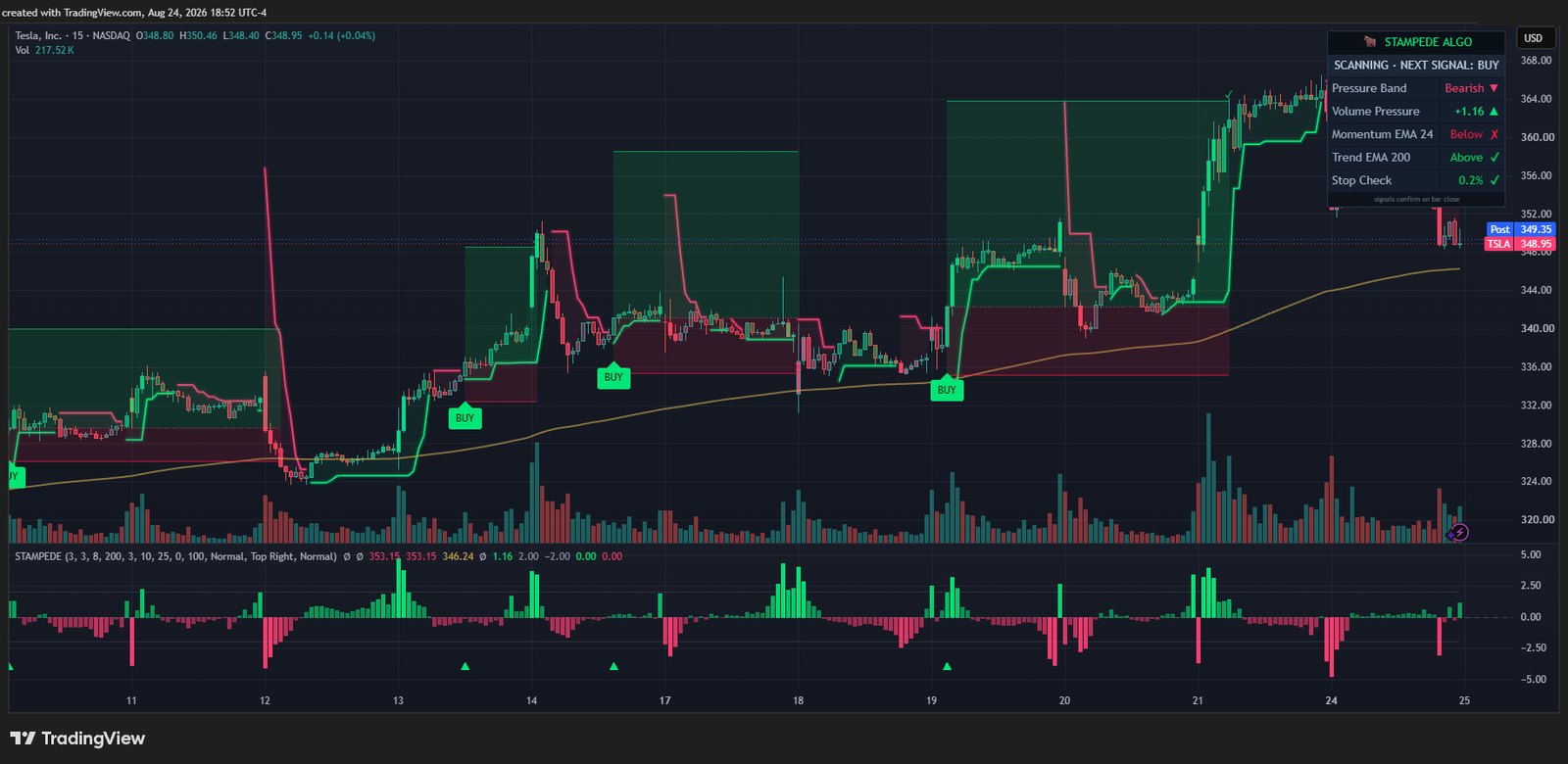
Atty Stampede Algo on a TSLA 15-minute chart: adaptive trailing band, BUY labels, stop and target zones, confluence dashboard, and the volume-pressure histogram pane.
Adaptive trailing bandWidens when volume pressure surges, tightens when it fades. A break plus trend agreement is what arms a signal.
Auto stop & target zonesEvery signal draws its stop at the recent swing and its target at 3× the risk. Green zone to target, red zone to stop — sizing math done before you click.
Confluence dashboardA live checklist in the corner: band direction, pressure reading, both trend gates, stop check. In a trade it shows entry, stop, target, and open R.
Volume-pressure paneThe raw reading the algo is watching, as a histogram under your chart — see the surge that caused the signal, not just the arrow.
Backtested In The Open

Same settings. Five markets. Full stats.

Straight from TradingView's Strategy Tester — one frozen configuration across every symbol, with commission and slippage included. No per-symbol tuning, no cherry-picked windows.

How these were produced: TradingView Strategy Tester · Jul 3, 2023 – Aug 24, 2026 · 15-minute chart · $100,000 simulated account · fixed order size (100 shares; GME 1,000 due to share price) · $0.005/share commission · 1 tick slippage · limit entries. These are hypothetical results on historical data — they are not real trading, and past performance does not indicate future results. Full CFTC Rule 4.41 disclosure in our Risk Disclaimer.
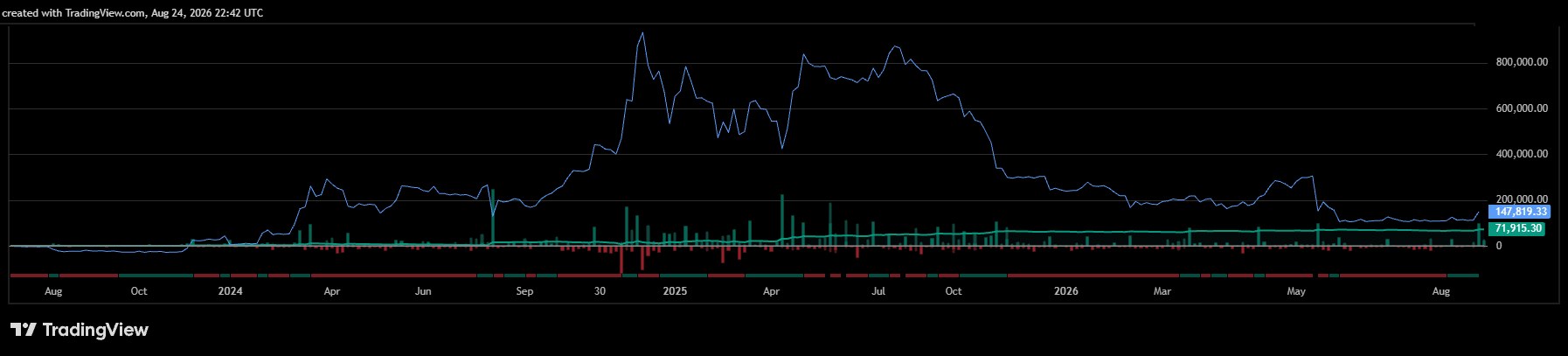
MSTRStrategy Inc · NASDAQ+$71,916
1.64Profit factor
275Trades
+71.9%Net return
11.0%Max drawdown
MSTR hypothetical equity curve from TradingView's strategy tester
100 shares/trade · 28.7% of trades hit targetView tester screenshot ↗
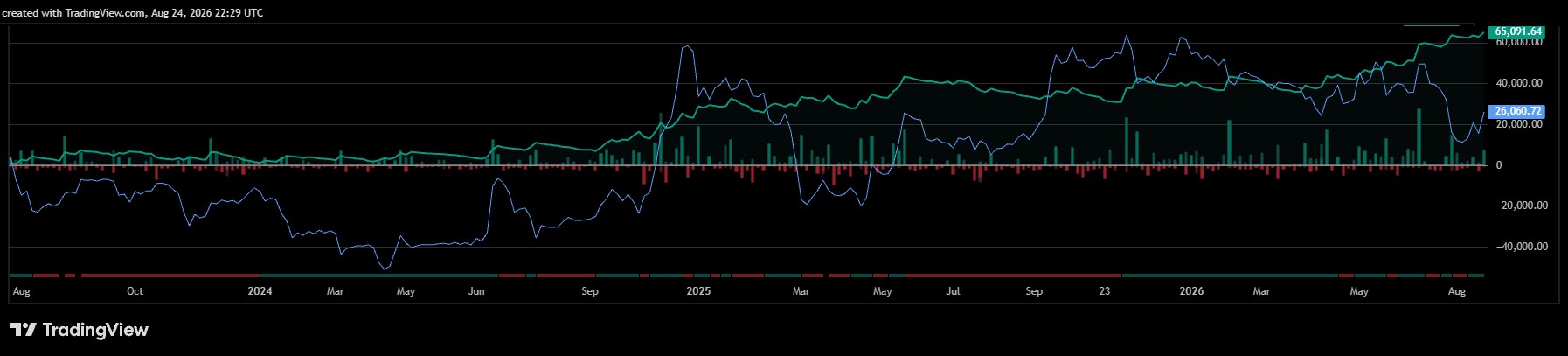
TSLATesla, Inc · NASDAQ+$65,091
1.55Profit factor
273Trades
+65.1%Net return
9.4%Max drawdown
TSLA hypothetical equity curve from TradingView's strategy tester
100 shares/trade · 30.4% of trades hit targetView tester screenshot ↗
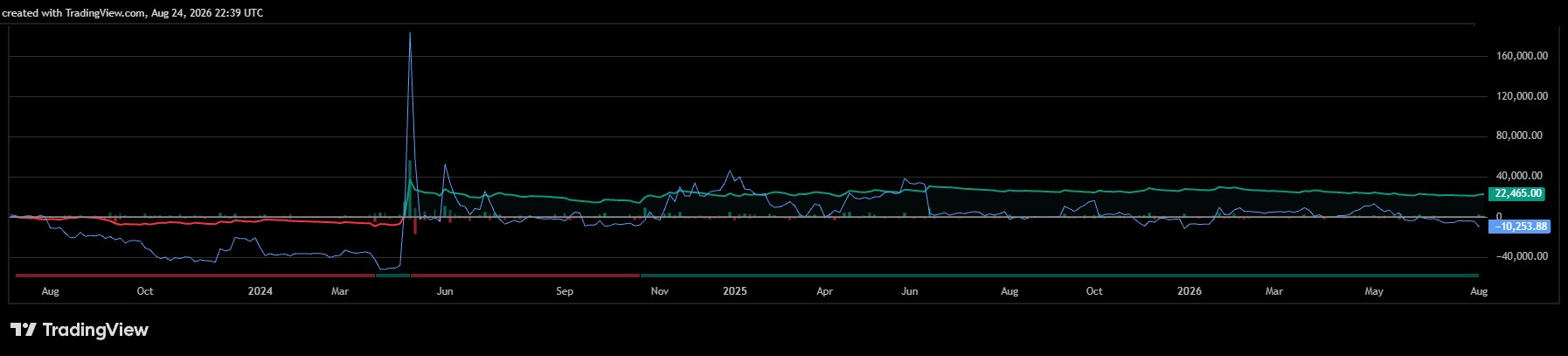
GMEGameStop Corp · NYSE+$22,475
1.17Profit factor
295Trades
+22.5%Net return
17.4%Max drawdown
GME hypothetical equity curve from TradingView's strategy tester
1,000 shares/trade · 23.7% of trades hit targetView tester screenshot ↗
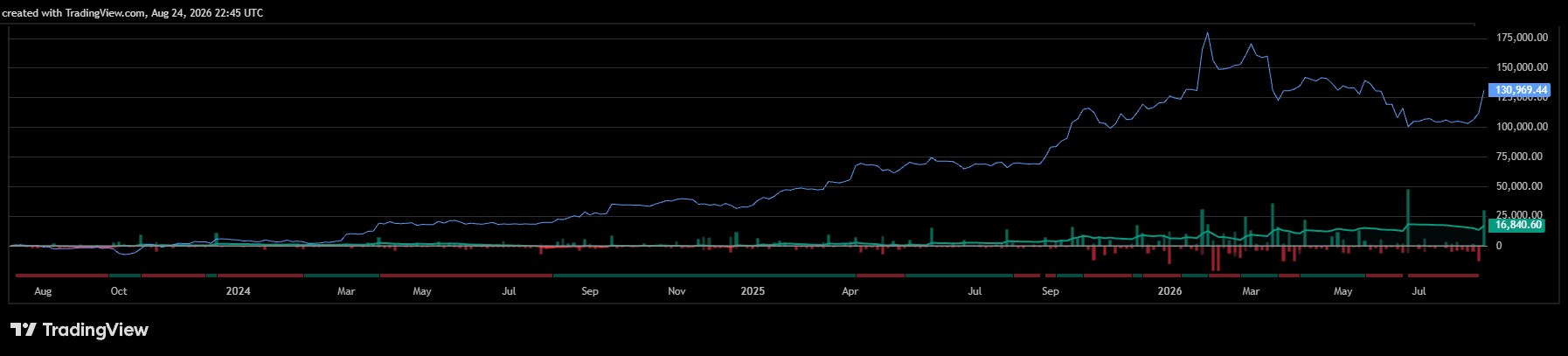
GLDSPDR Gold Shares · AMEX+$16,841
1.33Profit factor
273Trades
+16.8%Net return
7.2%Max drawdown
GLD hypothetical equity curve from TradingView's strategy tester
100 shares/trade · 27.8% of trades hit targetView tester screenshot ↗
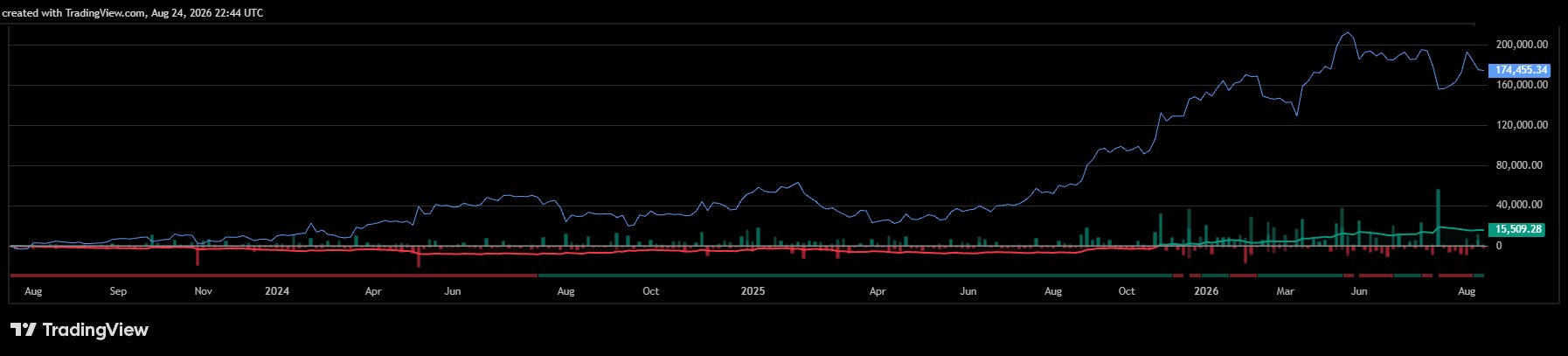
GOOGLAlphabet Inc · NASDAQ+$15,509
1.29Profit factor
261Trades
+15.5%Net return
8.7%Max drawdown
GOOGL hypothetical equity curve from TradingView's strategy tester
100 shares/trade · 28.4% of trades hit targetView tester screenshot ↗

Why these five?

Stampede hunts crowd surges, so it lives where crowds trade: liquid, volatile names with real participation. High-volume momentum stocks and gold are where it validated best.

Winners here are roughly 3× the size of losers by design — the algo pays for many small stops with fewer, larger target hits. That's why a sub-30% win rate can carry a positive expectancy.

Feature Set

Built for the trader who asks "why?"

BUY / SELL labels at bar close

Signals print when the bar completes and never repaint afterward. What you see in history is exactly what you'd have seen live — no vanishing arrows.

Automatic stop & target

Every signal ships with a stop at the recent 10-bar swing and a target at 3× the risk, drawn as zones on your chart with live price tags.

Confluence dashboard

An on-chart panel showing the exact state of every gate the algo checks — and once you're in a trade, your entry, stop, target, and open R at a glance.

Six alert conditions

Buy, Sell, Any Signal, Target Hit, Stop Hit, and Flip — wired into TradingView alerts, so your phone buzzes instead of you babysitting the chart.

Every setting adjustable

Sensitivity, band width, trend gates, risk multiple, colors, dashboard position — all configurable, and shipped with the defaults we validated so you can just run it.

"Allow Flip Signals" toggle

Choose whether an opposite signal reverses your read instantly, or gets ignored until the open trade resolves at its stop or target. Your style, your call.

The Difference

Most "algo indicators" vs this one

The typical magic indicator

  • Arrows that quietly redraw after the move
  • Promised win rates, no methodology
  • Backtests with zero commission or slippage — or none at all
  • "Works on everything" with proof of nothing
  • Signal with no stop, no target, no plan
  • Black box you're told to trust

Atty Stampede Algo

  • Signals lock in at bar close — no repainting after
  • No win-rate promises, ever — full stats published instead
  • Tester results include commission and slippage, settings disclosed
  • Validated markets shown, methodology disclosed
  • Stop and target drawn with every signal
  • Dashboard shows you exactly what the algo is reading
Pricing

Stampede comes with the Atty Algo Pack.

One subscription covers Stampede and every other tool in the pack. Access is delivered to your TradingView username and works on any TradingView plan, including free.

$89 a month, or $231 for 3 months, $854 a year, or $1,280 once.

Every plan includes Atty Stampede Algo, Atty SDP ATR Algo, Atty Execution Reality and Atty Session Map, plus any tool added to the pack later, at no extra cost. Atty ORB Breakout Retest Algo is in forward testing and not for sale until that record exists.

See plans and get the Algo Pack →

Not ready to buy? Start with the free tools.

Eleven free Atty Labs indicators, published open-source in the TradingView public library. No email, no invite, no waiting — add them to a chart in seconds and read every line of the source first. See how we build before you spend a dollar.

See the 11 Free Tools →
FAQ

Questions, answered straight

What exactly is Atty Stampede Algo?

An invite-only indicator for TradingView. It plots an adaptive volume-pressure trailing band on your chart, prints BUY and SELL labels when its conditions line up, and draws a stop-loss reference (from the recent 10-bar swing) and a take-profit level (3× the risk distance) for every signal. It also ships a volume-pressure histogram pane and an on-chart dashboard showing exactly what the indicator is reading. It marks up your chart and fires alerts; you decide how to act on it.

How do I get access after I buy, and how fast?

Checkout runs on Whop, which handles the payment, your receipts and your membership. After you pay, your Whop membership page shows a box for your TradingView username: type it in, click Set, then Claim Indicators. Whop adds every tool in the pack to that account through TradingView's invite-only system, usually within minutes. We never ask for your TradingView password.

The TradingView listing is here — the listing is public, the access and the source are not.

Once granted, the indicator appears under Indicators → Invite-only scripts and you add it to a chart like any other indicator. Your Whop account is also where you manage the subscription: download receipts, switch plans or cancel in a couple of clicks, with no email to us needed. If you cancel, access stays until the end of the period you paid for, and Whop removes it automatically after that.

If access has not appeared an hour after checkout, email support with the address you paid with and we will sort it out.

What TradingView plan do I need?

Any plan works, including Free. Two practical notes: TradingView caps indicators-per-chart and active alerts, and those caps are tighter on the Free plan. If you want Stampede running alongside several other indicators with multiple alerts live, a paid TradingView plan gives you headroom. That subscription is TradingView's own and separate from anything here.

What markets and timeframes does it work on?

It runs on anything TradingView can chart — stocks, futures, forex, crypto — on any timeframe. It was developed and validated on 15-minute charts of liquid, volatile stocks and gold, and that is where our published results come from. It will compute anywhere else too; test those markets yourself before you trade them.

Does it repaint?

No. Signals confirm at bar close and do not repaint after close. Once a BUY or SELL label prints on a closed bar it stays exactly where it printed — it will not move, vanish, or redraw when you reload. While the current bar is still forming, calculations update tick-by-tick like any live indicator; that's why signals only confirm when the bar completes.

When do signals actually appear?

At the close of the signal bar — not before. On a 15-minute chart, that means the moment the bar completes. We'd rather give you a slightly later, honest signal than an early one that could evaporate before the close. Historical labels appear on the same bar-close basis, so what you see in history is what you would have seen live.

How do alerts work? Can I get them on my phone?

The indicator ships with six alert conditions: Buy, Sell, Any Signal, Target Hit, Stop Hit, and Flip. Create alerts the standard TradingView way — pick Atty Stampede Algo as the condition, choose the event, choose delivery. TradingView can push alerts to its mobile app, plus popups, email, and webhooks depending on your TradingView plan. Set a Buy alert once and your phone buzzes when a signal confirms.

What's in the settings? Can I adjust it?

Everything: band sensitivity and width, both trend gates, the risk-reward multiple, swing lookback, signal labels, trade zones, candle coloring, dashboard position and size, the pressure pane, and all colors. Every purchase includes a setup guide describing each setting and the defaults we validated on 15-minute charts. Our suggestion: run the defaults first, understand what the tool is telling you, then tune.

What does the "Allow Flip Signals" toggle do?

A "flip" is when the indicator reverses its stance directly — printing a SELL while the previous BUY is still in play, rather than waiting for the stop or target first. With the toggle on, you see those direct reversals (and can alert on them). With it off, the indicator stays with a signal until its stop or target resolves, filtering mid-trade reversals. Neither mode is "correct" — flips react faster in reversals but signal more often. It exists so the tool matches how you trade.

What's the difference between the plans?

Stampede is part of the Atty Algo Pack, and every plan includes the same tools, updates and support. Only billing differs. Monthly ($89) renews each month. 3-Month ($231) renews quarterly, $77 a month. Annual ($854) renews yearly, about $71 a month. Lifetime ($1,280) is one payment, no renewals. Lifetime means the lifetime of the Atty Algo Pack for one TradingView username — details in the Terms.

How do I cancel?

Anytime, from your Whop account (whop.com → your memberships), or by emailing support from your purchase email. Cancelling stops all future charges; you keep access until the end of the period you've paid for, then your username comes off the access list. No cancellation fee, and you can re-subscribe later with the same username.

What's your refund policy?

If it's not for you, email us within 7 days of your first purchase and we'll refund it in full — once per customer, first purchase only, any plan. Renewals and repeat purchases are final; cancelling always stops future charges. Billing mistakes (duplicates, renewals after timely cancellation, or our failure to deliver access within 24 hours) are refunded in full regardless. Full details on the Refund Policy page.

Is this financial advice? Will you tell me what to trade?

No. Atty Stampede Algo is an analytical tool — its labels and levels are the output of a formula applied to price and volume data, not recommendations. Atty Labs is not a registered investment advisor, broker, or commodity trading advisor, we never touch your brokerage account, and the indicator places no trades. Every decision stays yours. Full detail in the Risk Disclaimer.

What win rate should I expect?

In our published tests it runs from 23.7% to 30.4%, and that is by design: winners target 3× the risk of losers, so the math works without a high hit rate. Any tool advertising a high win rate is telling you about its marketing, not its math. What you get depends on the market, your settings, and your own discipline.

Can I try before I buy?

Yes — the eleven free tools are published open-source in the TradingView public library. There is nothing to request and nothing to wait for: open a listing, click Add to chart, and read the source if you want to see exactly how we build. They are separate tools in their own right, not limited versions of Atty Stampede Algo.

How do I get support?

Email support@attyalgo.com. We answer setup, access, settings and billing questions, typically within one business day. Include the TradingView username you purchased with when writing about access, and a screenshot if something looks wrong on your chart — it usually gets you an answer in one reply.

Can I use it on two TradingView accounts, or share with a friend?

No — your license covers exactly one TradingView username, the one you give at checkout. Access is granted per-username on TradingView's invite-only system, so it can't be shared or split. Sharing or redistributing the script violates the Terms and ends access without refund. If you change usernames, email support and we'll transfer your access (limit: once per 90 days).

See the stampede coming.

Part of the Atty Algo Pack, granted to your TradingView account after checkout. Signals, stops, targets, and the reasoning behind them — on your chart in minutes, alongside every other tool in the pack.